

AI is great, if it has enough context. If you’re still just using the chat window to research stocks, this article is for you. The problem with chat alone: things get lost, you have no idea what you researched three months ago, the LLM lacks context which can lead to wrong info and hallucinations, and nothing is saved outside the chat (no overview).
Since April, I’ve been using a setup I read about first on X that turns the LLM into my second brain. It gives the LLM context, a place to store everything, and an easy way to find any answer on a stock.
In this article, I’ll show you what it is and why I use it (and why I recommend you use it too). Then I’ll give you step-by-step instructions to set it up on your own computer.
This isn’t my own idea, of course. I simply implemented the “knowledge base” setup Andrej Karpathy described in this tweet:

What it is
At its core, the setup is one folder connected to Claude Code. To see it visually, you use Obsidian. The end result looks something like this:
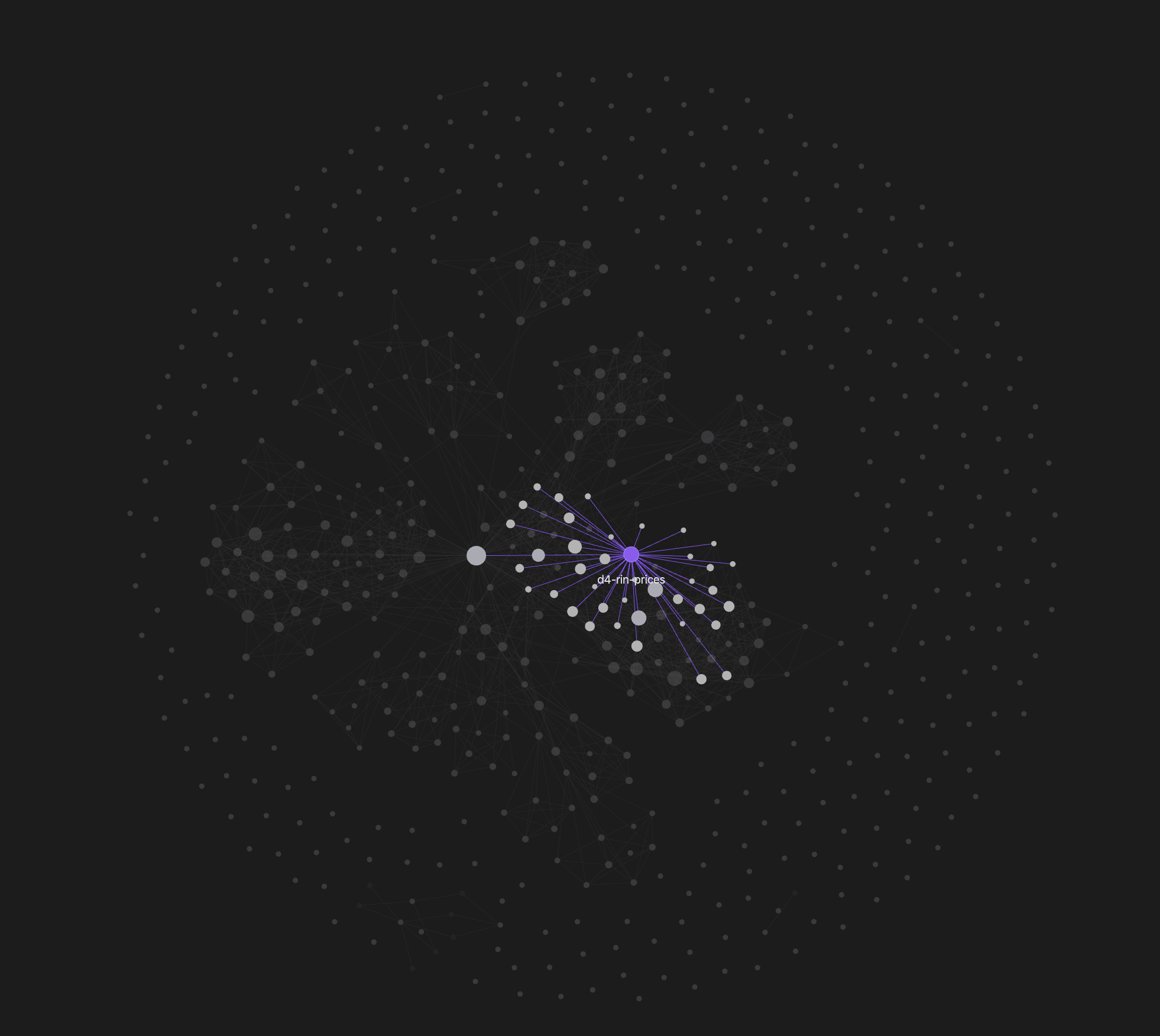
Each dot is a page in the vault, and the lines show how they’re connected. D4 RIN prices, a major thesis in my portfolio, is highlighted here as an example and linked to many pages in the vault.
How it works
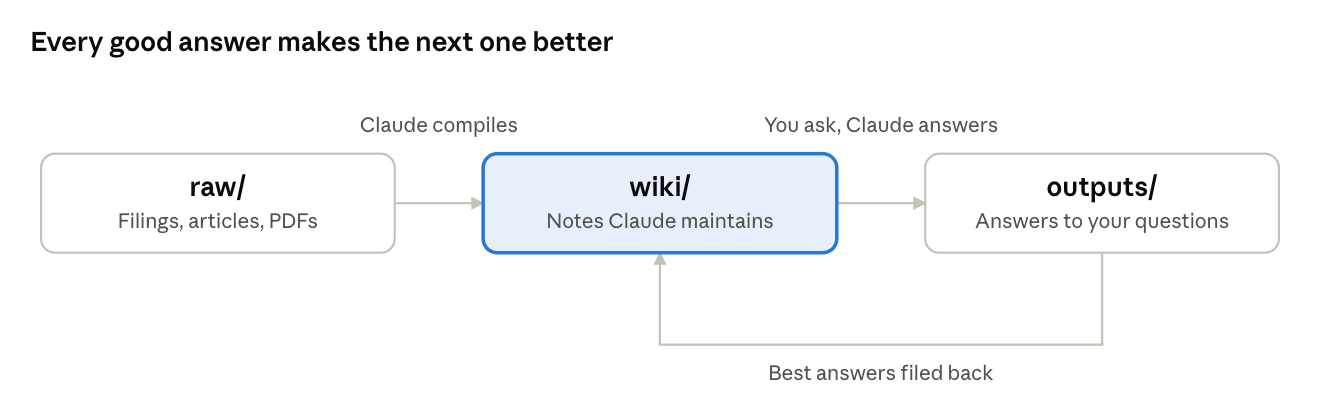
You’ll have three folders: raw, wiki and outputs. The raw folder is where you dump all your information. Claude is instructed never to add or change anything in raw. That way, the input stays high quality and comes only from you.
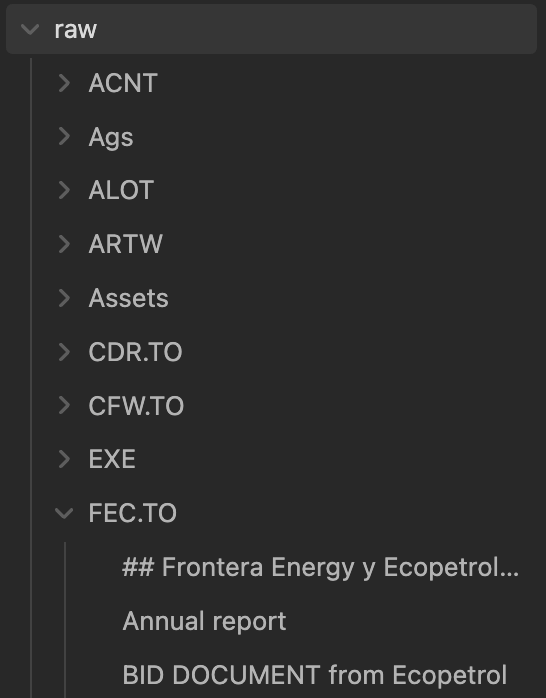
Here’s my setup: inside raw, I have one folder per ticker, and I save every piece of information there as a Markdown file.
If you want to convert a PDF (like an annual report) as a Markdown file, I recommend this website. I upload every new piece of info on a name into raw.
Once I’ve added new info, I open Claude Code (connected to my local folder; setup below). Either I tell it there’s new info in raw and it follows the instructions in the vault, or I ask a specific question.
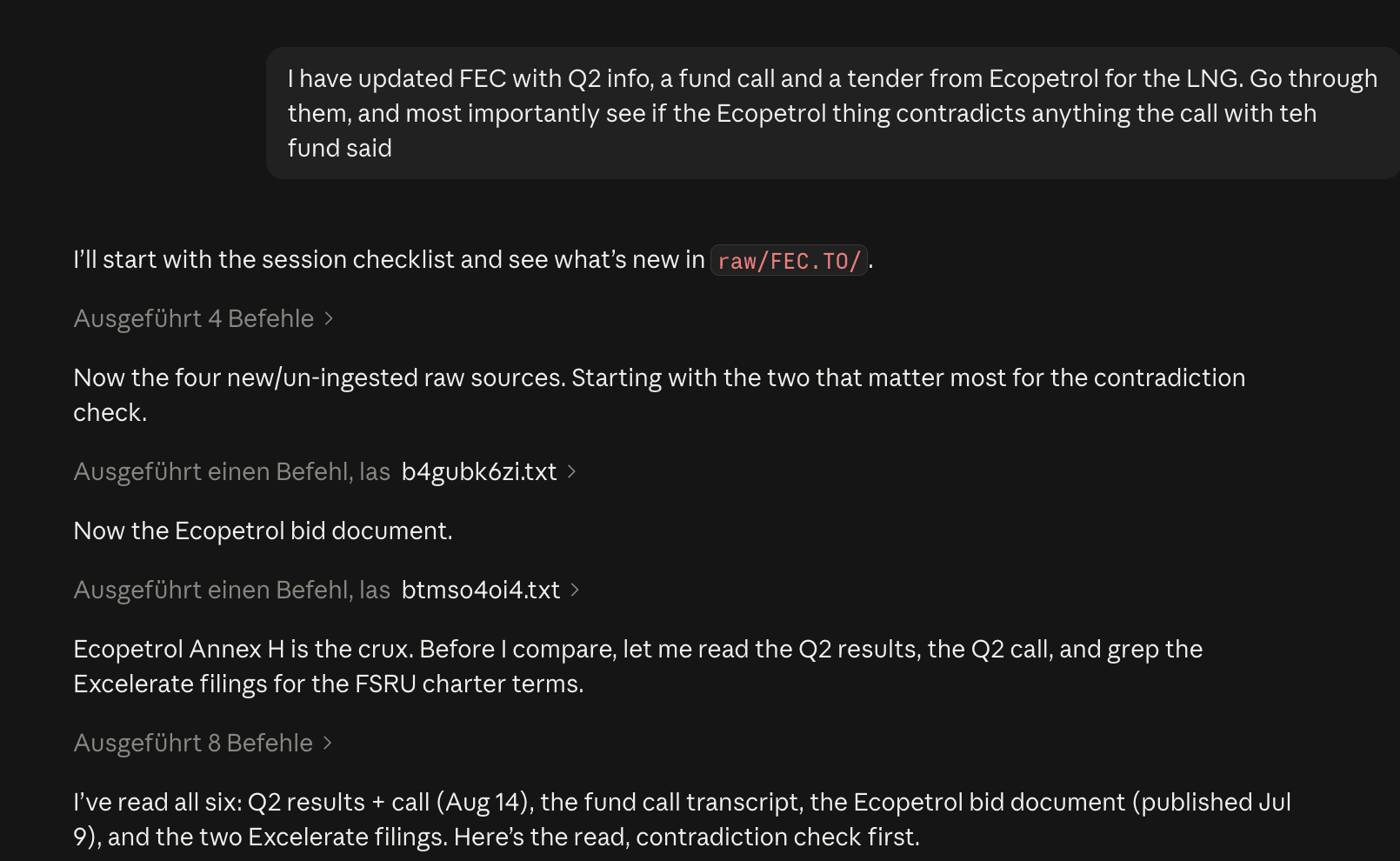
Usually, Claude’s job is to build and update the wiki from what’s in raw. This is what it looks like in practice:
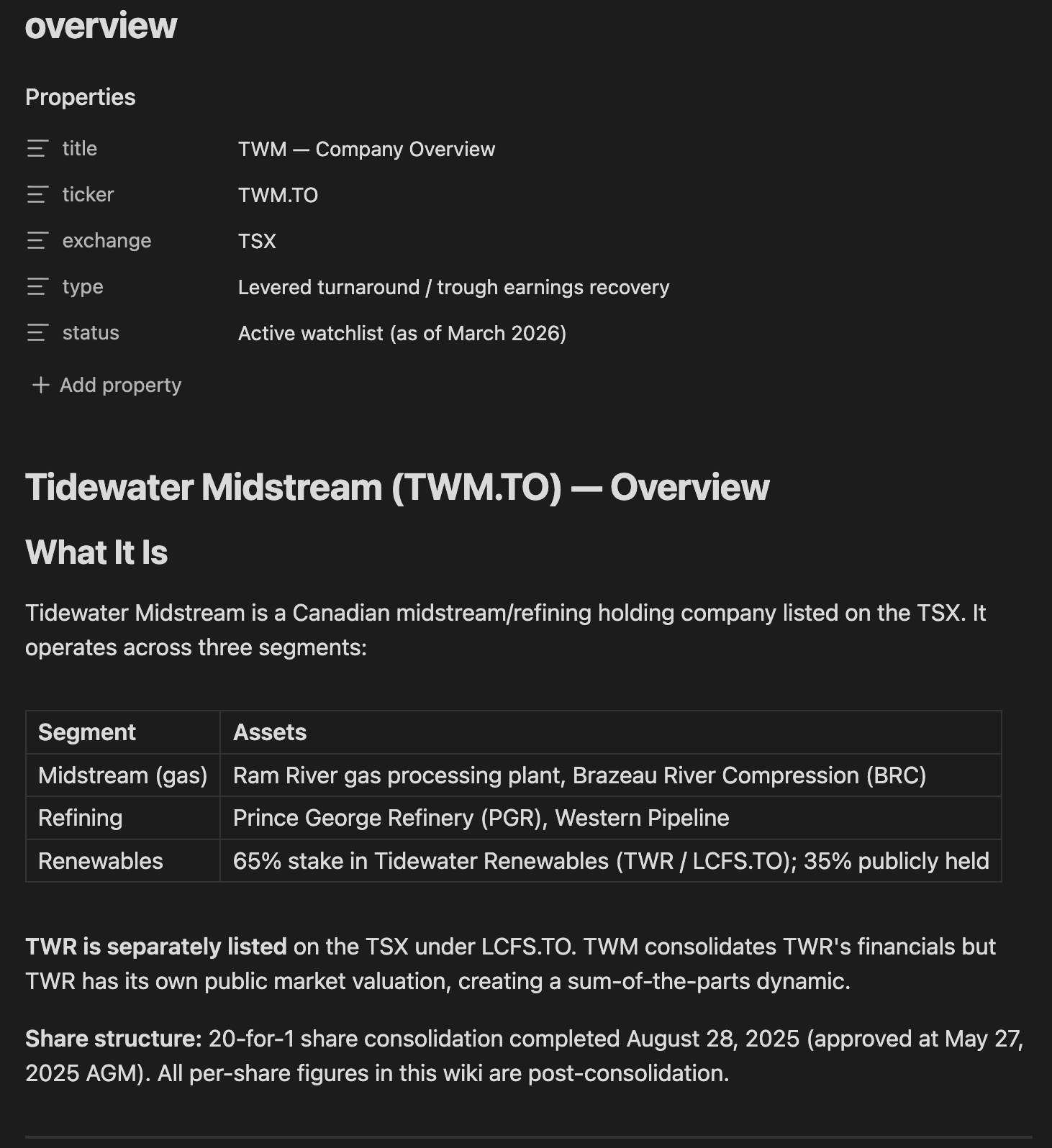
Every created page is linked to the pages that are relevant to its topic, creating an easily readable path to the connections within the vault.
Cross-checking and finding information
As readers may know, I’m (as of this writing) invested in Tidewater Midstream and Infrastructure (TWM.TO). Since it operates both a traditional and a renewable refinery, I’ve uploaded the earnings call transcripts from the major refiners, as well as from Darling, the biggest renderer and, through its Diamond Green Diesel joint venture, a RIN generator.
Because the vault holds all my TWM information, Claude can easily summarize competitors’ earnings calls, focusing on the points that matter for the TWM thesis.
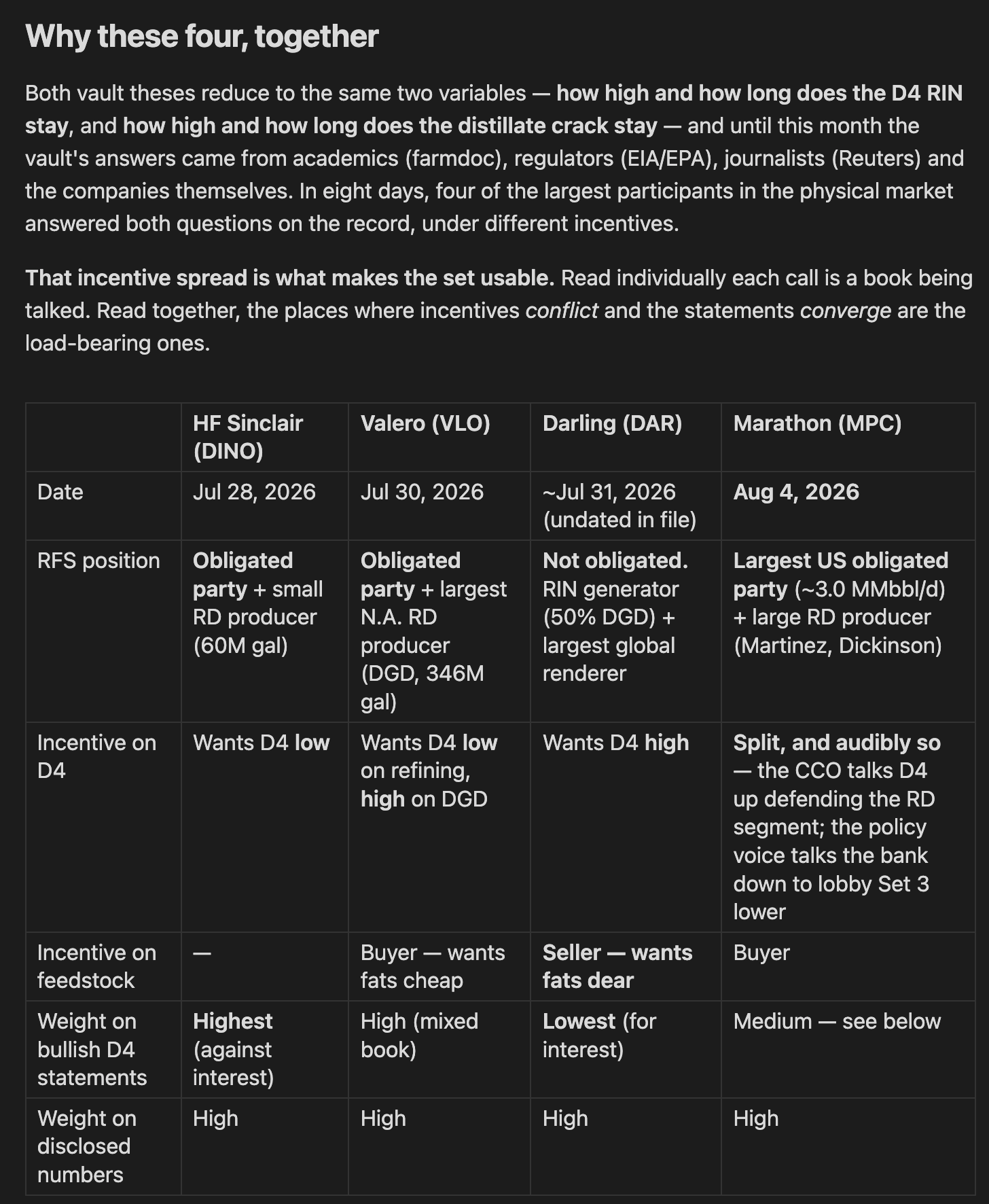
It can also generate outputs, like valuation sheets, which are saved in the outputs folder. And since it has everything you’ve uploaded on a stock, you can ask Claude a specific question and it will pull the answer straight from your files.
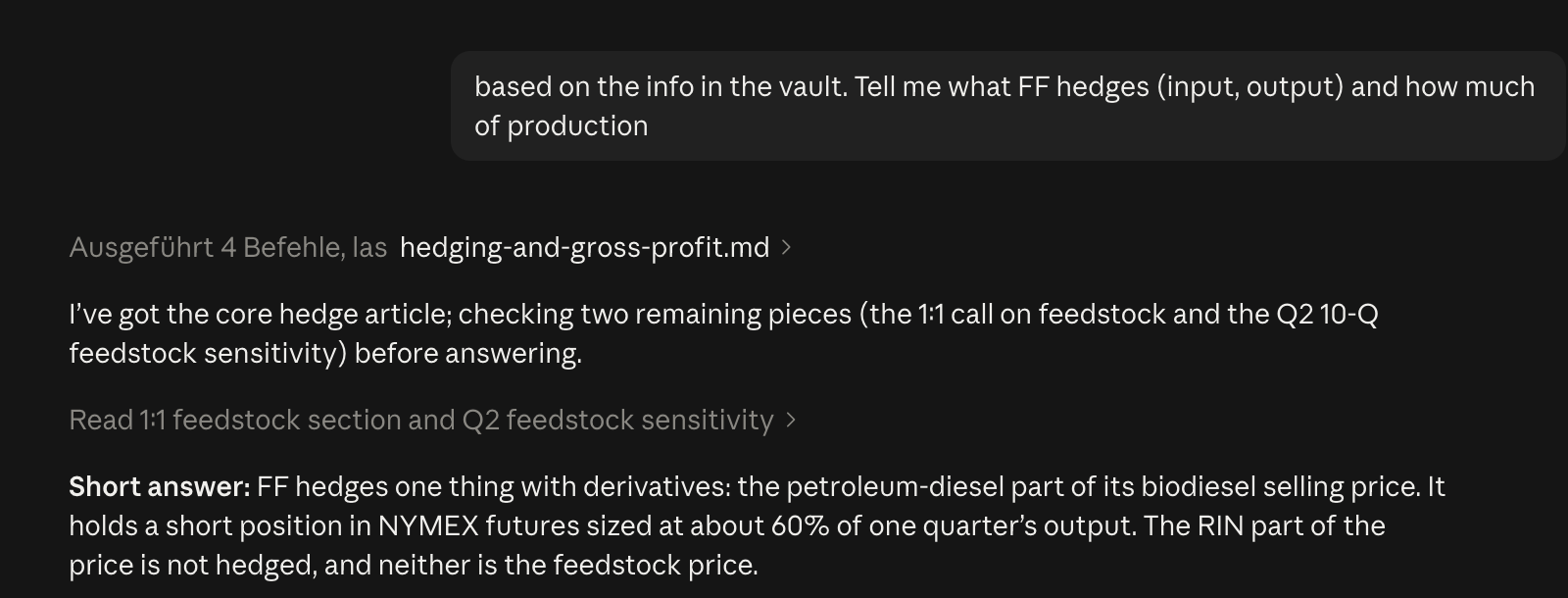
Why I use it
Everything in one place. I have one folder where everything is stored, which means that in Obsidian, I can look up everything I want about a stock or a topic. In chats, lots of info gets lost.
Always up to date. The wiki is updated every time I add something, and log.md shows the timeline of how new info came in.
Everything is connected, so I can quickly ask about the effect a piece of news has on ALL stocks, not just the one I am currently chatting about. Since the LLM has access to the entire vault, it searches across all the info in the folder, which makes it much less likely to miss a stock or a piece of info.
Better quality. The accuracy of the answers improves immensely. LLMs need context and (easy) access to information.
How to set it up yourself
What you need
Obsidian. A free note-taking app that stores everything as plain Markdown files in a folder on your computer. There’s no database and no lock-in, just files an AI can read and write.
Claude Code. Anthropic’s agentic tool. Unlike the Claude chat window, it works directly on files on your machine. I use the desktop app.
A synced folder (optional). I keep my vault on iCloud Drive so I can read the wiki on my phone. Dropbox or Google Drive work the same way.
You don’t need to code. Everything below is done by typing instructions in plain English.
Step 1: Create the vault and the three folders
In Obsidian, create a new vault (mine is called “Stock Ideas”). Right-click in the file panel, choose “New folder”, and create raw, Wiki and output. Under raw, add one subfolder per ticker or theme, e.g. raw/ABC.TO/. Claude creates everything inside Wiki and output itself.
Step 2: Point Claude Code at the vault
Claude Code works inside one folder at a time. In the desktop app, pick that folder at the bottom left of the window. Choose the top-level vault folder, not one of the subfolders. From now on, anything Claude writes shows up live in Obsidian.
One gotcha: an Obsidian vault on iCloud Drive doesn’t live where you’d expect. On a Mac it sits under ~/Library/Mobile Documents/com~apple~CloudDocs.
Step 3: Write CLAUDE.md, the rulebook
Claude Code automatically reads a file called CLAUDE.md in the folder’s root at the start of every session. Think of it as the standing brief for your research assistant. Without it, you’d have to re-explain the rules every session. Here is a starting version you can paste in:
# CLAUDE.md — Stock Ideas Vault

Read this file at the start of every session. It defines the structure,
conventions and workflows for this wiki. Don't deviate from them without
updating this file.

## Overview
A personal investment research knowledge base in Obsidian. Claude owns the
wiki layer: creating, updating and cross-referencing pages. I curate the
sources, direct the analysis and ask the questions.

| Layer | Folder | Owner | Rule |
|---|---|---|---|
| Raw sources | raw/ | Me | Immutable. Read, never modify. |
| Wiki | Wiki/ | Claude | Claude creates and updates all pages |
| Outputs | output/ | Claude | Scenario analyses, models, deliverables |

## Structure
Stock Ideas/
├── CLAUDE.md
├── raw/<TICKER>/          ← my source documents
├── Wiki/
│   ├── index.md           ← master entry point
│   ├── log.md             ← append-only session log
│   └── <TICKER>/index.md  ← topic hub
└── output/<TICKER>/       ← analyses worth keeping

Naming: folders use the exact ticker with exchange suffix (e.g. ABC.TO).
Article files use lowercase hyphenated slugs (e.g. q3-2026-call.md).

## Wiki conventions
Every article starts with frontmatter:
  title, source, type, last_updated (YYYY-MM-DD)
type is one of: overview | analysis | primary-source | regulatory | macro | valuation

Every topic index.md has three sections:
1. Articles table: every article with a one-line summary
2. Key Numbers at a Glance: always current
3. Thesis in One Paragraph: updated on every material ingest

The master Wiki/index.md has a Topics at a Glance table, one section per
topic (thesis, current status, biggest risk) and a Cross-Topic Connections table.

Link related articles with relative markdown links and end every article
with a Related Articles section. State the reporting currency at the top
of every non-index page.

## Source hierarchy
1. Primary: my own notes. Treat with high confidence.
2. Secondary: audited financials, MD&A, press releases
3. Tertiary: earnings call transcripts, analyst updates
4. Quaternary: write-ups, external research, news
When sources contradict, the higher one wins. Note the contradiction.

## Verification tags (valuation articles)
VERIFIED: confirmed against public filings
DIRECTIONAL: direction confirmed, magnitude uncertain
PARTIAL: partially confirmed; note what was adjusted
CHALLENGED: contradicted by another source; note the conflict
UNVERIFIED: no public confirmation; excluded from base case

## Workflows

Ingest (when I add a file to raw/<TICKER>/):
1. Read the source fully.
2. Discuss key takeaways with me before writing anything.
3. Write the article in Wiki/<TICKER>/ with frontmatter.
4. Update the topic index.md: articles, key numbers, thesis.
5. Update Wiki/index.md.
6. Cross-check other topics: does this change anything elsewhere?
7. Append a line to Wiki/log.md: date, action, files touched.

Query:
1. Read Wiki/index.md first, then the relevant topic hubs and articles.
2. Answer with links to the wiki pages used.
3. If the answer is valuable, save it in output/<TICKER>/.
   Good answers should not disappear into chat history.

Lint (only when I ask):
Look for contradictions, stale numbers, orphan pages, missing pages and
cross-links, and outdated Key Numbers tables. Report findings as a list.
Don't auto-fix; ask me which to address.
Step 4: Run the first compile
Start with one idea you know well, not your whole watchlist. Drop everything you have on it into its raw subfolder. Then type into Claude Code:
Ingest everything in raw/ABC.TO/ following CLAUDE.md.Because of the ingest rules, Claude first discusses the key takeaways with you, and only then writes the articles, the topic hub and the master index. That conversation is often the most useful part: it’s where you spot what the sources actually say versus what you assumed.
Step 5: Make it a routine
Ingest. Add new material to raw and tell Claude to ingest it. One new document can touch many pages, including other companies it affects.
Ask. Claude reads the master index first, then the topic hubs and articles, and answers with links to the pages it used.
Keep the good answers. When an answer is worth keeping, like a scenario analysis or a cross-company question, Claude saves it in
output/. Next time, it’s there to build on.Lint. Every so often, ask Claude to health-check the wiki. It reports contradictions, stale numbers and gaps as a list, and you decide what to fix.
Wiki/log.md records every session with a date, which is where the timeline of how a thesis evolved comes from.
The whole thing takes an afternoon: install Obsidian and Claude Code, make three folders, paste in a CLAUDE.md, and drop in everything you have on one company you know well.
Disclaimer: This is not investment advice and meant for entertainment purposes only, I hold a position in the discussed companies and therefore may be biased in my opinion. Please be aware that this is an illiquid Microcap, please only buy and sell with a limit-order. I also may trade around the mentioned positions.
Great setup. You should check out Wikilink Types (https://github.com/penfieldlabs/obsidian-wikilink-types). It lets you label the relationships between wiki-linked notes (supersedes, contradicts, supports, etc.) using typed syntax right in the link text. The relationships get synced to YAML frontmatter automatically, so Dataview can query them. For your use case, Claude could write links like [[TWM.TO Analysis|Latest earnings @supersedes previous quarter @contradicts bear thesis]] and you’d get a queryable relationship graph across your whole research vault, not just connections but what kind of connections. Pairs well with the lint workflow you described since Claude could flag contradictions by type rather than just finding them.
Found this hugely helpful, thanks Sebastian!